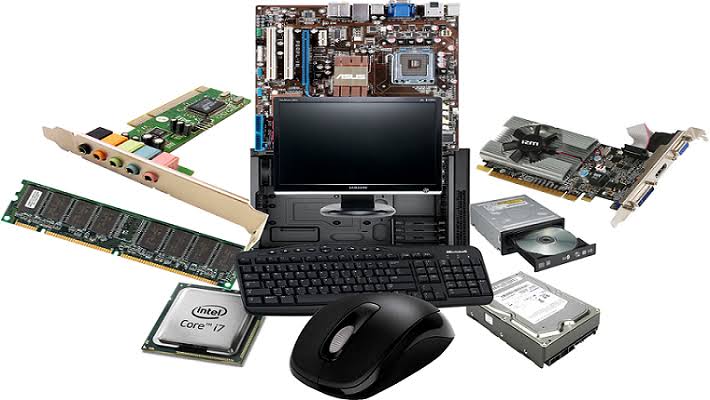
Computer hardware is the physical parts or components of a computer.
Inside the hardware. Hardware refers to the physical elements of a computer. Also referred to as the machinery or the equipment of the computer. Examples of hardware in a computer are the keyboard, the monitor, the mouse and the processing unit However, most of a computer’s hardware cannot be seen; It’s inside the computer case.
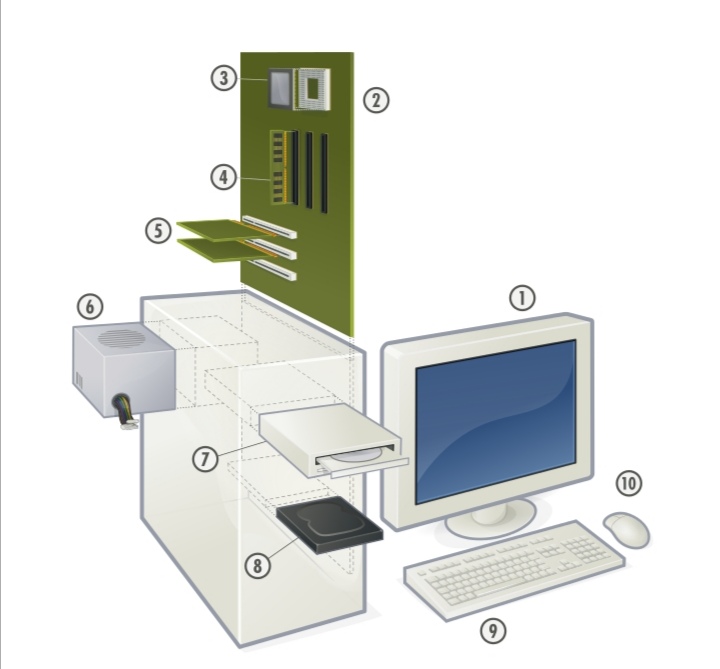
1.Monitor
2.Mouse
3.Mother board
4.Keyboard
5.Computer data storage
6.Hardisk drive (HDD)
7.Graphic cards
8.Sound cards
9.Memory All of which are physical objects that are tangible.by contrast,software is the set of instructions that can be stored and run by hardware.
COMPUTER HARDWARE: PARTS & FUNCTION
1.External Components
2.Mouse The mouse is a pointing device that sends control signals into the computer. It is used to move the cursor (usually arrow icon) on the screen and to perform click actions.3. Monitor It is used to display data in visual form (which can only be seen).The images it display are where the user gets information.
4. Keyboard This contains set of keys that are used to input characters (letters, numbers) and control signals into the computer.
5. AutomaticVoltage Regulator It protects the computer from changes in the electricity that may damage the computer components. It regulates the voltage that goes to the computer.
6. System Unit It serves as a container of the computer’s internal parts (motherboard, CPU, etc.
THE INTERNAL COMPONENTS
1.Power Supply Unit It converts the main alternating current into low-voltage direct current that is supplied to other parts. 2.A power supply unit has its own fan.
3.Hard Disk Drive It is the main storage device of the computer. It is where most of the files of the computer (such as the ones found in Desktop) are stored.
4.Optical Disc Drive It reads or writes data into optical discs (CD, DVD, Blu-ray Disc
5.Random Access Memory Module It is the temporary storage device of the computer. It is used to hold the data that the computer is working on. The black rectangles are called RAM chips.
6.Central Processing Unit This is referred to as the computer’s brain as it does the processing job of the computer.This means that it is responsible for manipulating the data.
7.CPU Fan and Heatsink These two components work together in keeping the CPU from overheating.The metal is called the heatsink as it conducts heat from the CPU while the CPU fan blows the air to the heatsink.2
8.System Fan This is found at the left side panel and the back panel of the system unit. It directs the flow of air in the system unit.
9.Motherboard It is the main circuit board of the computer that connects all other part
PARTS OFTHE MOTHERBOARD
1.Expansion Slots These are where the expansion cards such as modem card and graphics card are installed.These are different types of slots.
2. RAM Slots These are where the RAM modules are installed.
3.Northbridge Located between theCPU socket, Expansion slots, and RAM slots. It coordinates the flow of data between theCPU, graphics card, and RAM
4.Southbridge Located below the expansion slots, the Southbridge handles all of the computer’s input/output functions.
The location of the two Chipsets
5.BIOS Chip It stands for Basic Input/Output System. It contains the program that checks devices to know if the computer is ready to startup.
6.CMOS RAM It is the one that holds data used by the BIOS or Operating System.These data includes time, date, BIOS password.
7.CMOS Battery It provides the power used by the CMOS RAM so that even when the computer is off, the CMOS RAM can still keep data (this means time and date will not be reset).
8.Back Panel Ports Located at the back of the motherboard.This is where most of the computer peripherals are connected. These peripherals include the keyboard, mouse, and printer.
Front Panel Headers It is mostly located at the left and front side of the motherboard. Most computers have three front panel headers: system panel headers, audio headers, USB headers.
CPU Socket It is where the CPU is installed.
20+4 Pin ATX Main Power Connector It is where the 20+4 Pin ATX Main Power Connector of the PSU is connected.
4 Pin ATX 12V Power Connector It is where the 4 Pin ATX 12V Power Connector of the PSU is connected.
CPU Fan Header It is where the CPU fan is connected to get its power.
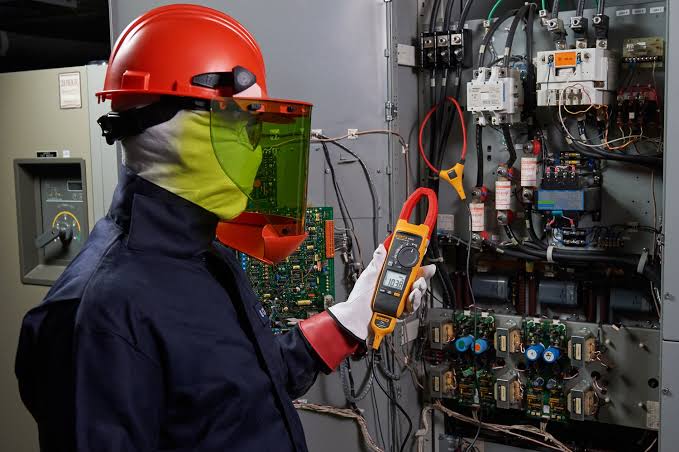
Personal protective equipment (PPE)
It refers to protective clothing, helmets, goggles, or other garments or equipment designed to protect the wearer’s body from injury or infection. The hazards addressed by protective equipment include physical, electrical, heat, chemicals, biohazards, and airborne particulate matter. Protective equipment may be worn for job-related occupational safety and health purposes, as well as for sports annd other recreational activities. “Protective clothing” is applied to traditional categories of clothing, and “protective gear” applies to items such as pads, guards, shields, or masks, and others.
The purpose of personal protective equipment is to reduce employee exposure to hazards when engineering and administrative controls are not feasible or effective to reduce these risks to acceptable levels. PPE is needed when there are hazards present. PPE has the serious limitation that it does not eliminate the hazard at source and may result in employees being exposed to the hazard if the equipment fails.
Safety Glove
It is a garment covering the whole hand. Gloves have separate sheaths or openings for each finger and the thumb; if there is an opening but no (or a short) covering sheath for each finger they are called fingerless gloves. Fingerless gloves having one large opening rather than individual openings for each finger are sometimes called gauntlets, though gauntlets are not necessarily fingerless.
Gloves which cover the entire hand or fist but do not have separate finger openings or sheaths are called mittens. Mittens are warmer than gloves made of the same material because fingers maintain their warmth better when they are in contact with each other. Reduced surface area reduces heat loss.
Safety Goggles
Safety Googles or safety glasses are forms of protective eyewear that usually enclose or protect the area surrounding the eye in order to prevent particulates, water or chemicals from striking the eyes.
Antistatic wrist strap
ESD wrist strap, or ground bracelet is an antistatic device used to safely ground a person working on very sensitive electronic equipment, to prevent the buildup of static electricity on their body, which can result in electrostatic discharge (ESD).
Antistatic garments
Antistatic garments or antistatic clothing is required to prevent damage to electrical components or to prevent fires and explosions when working with flammable liquids and gases.
Anti-static Shoes
Anti-static Shoes or Static Dissipating Safety Shoes and Soft-Toe shoes are designed to dissipate (reduce) the amount of static electricity build-up on your body.
Dust mask
It is a flexible paper pad held over the nose and mouth by elastic or rubber straps for personal comfort against non-toxic nuisance dusts. A dust mask is also used to prevent the wearer from inhaling dust or sand in a dust storm or black blizzard.
Earmuffs
These are objects designed to cover a person’s ears for hearing protection or for warmth. They consist of a thermoplastic or metal head-band, that fits over the top or back of the head, and a cushion or cup at each end, to cover the external ears. This article focuses on earmuffs that are worn for hearing protection.Personal protective equipment (PPE)
It refers to protective clothing, helmets, goggles, or other garments or equipment designed to protect the wearer’s body from injury or infection. The hazards addressed by protective equipment include physical, electrical, heat, chemicals, biohazards, and airborne particulate matter. Protective equipment may be worn for job-related occupational safety and health purposes, as well as for sports annd other recreational activities. “Protective clothing” is applied to traditional categories of clothing, and “protective gear” applies to items such as pads, guards, shields, or masks, and others.
The purpose of personal protective equipment is to reduce employee exposure to hazards when engineering and administrative controls are not feasible or effective to reduce these risks to acceptable levels. PPE is needed when there are hazards present. PPE has the serious limitation that it does not eliminate the hazard at source and may result in employees being exposed to the hazard if the equipment fails.
Safety Glove
It is a garment covering the whole hand. Gloves have separate sheaths or openings for each finger and the thumb; if there is an opening but no (or a short) covering sheath for each finger they are called fingerless gloves. Fingerless gloves having one large opening rather than individual openings for each finger are sometimes called gauntlets, though gauntlets are not necessarily fingerless.
Gloves which cover the entire hand or fist but do not have separate finger openings or sheaths are called mittens. Mittens are warmer than gloves made of the same material because fingers maintain their warmth better when they are in contact with each other. Reduced surface area reduces heat loss.
Safety Goggles
Safety Googles or safety glasses are forms of protective eyewear that usually enclose or protect the area surrounding the eye in order to prevent particulates, water or chemicals from striking the eyes.
Antistatic wrist strap
ESD wrist strap, or ground bracelet is an antistatic device used to safely ground a person working on very sensitive electronic equipment, to prevent the buildup of static electricity on their body, which can result in electrostatic discharge (ESD).
Antistatic garments
Antistatic garments or antistatic clothing is required to prevent damage to electrical components or to prevent fires and explosions when working with flammable liquids and gases.
Anti-static Shoes
Anti-static Shoes or Static Dissipating Safety Shoes and Soft-Toe shoes are designed to dissipate (reduce) the amount of static electricity build-up on your body

A network consists of two or more computers that are linked in order to share resources (such as printers and CDs), exchange files, or allow electronic communications. The computers on a network may be linked through cables, telephone lines, radio waves, satellites, or infrared light beams.
Types of Network
There are many different types of network, which can be used for different purposes and by different types of people and organization. Here are some of the network types that you might come across:
- Local Area Networks (LAN)
A local area network or LAN is a network that connects computers within a limited area. This might be in a school, an office or even a home. - Personal Area Networks (PAN)
A personal area network is a network that is based on an individual’s workspace. The individual’s device is the center of the network, with other devices connected to it. There are also wireless personal area networks. - Home Area Networks (HAN)
A home area network connects devices within a home environment. It might include personal computers, tablets, smartphones, printers, TVs and other devices. - Wide Area Networks (WAN)
A wide area network is a network that covers a larger geographical area, usually with a radius of more than a kilometer. - Campus Networks
A campus network is a LAN or set of connected LANs which is used by a government agency, university, corporation or similar organization and is typically a network across a set of buildings that are close together. - Metropolitan Area Networks (MAN)
Metropolitan area networks are networks that stretch across a region the size of a metropolitan area. A MAN is a series of connected LANs in a city, which might also connect to a WAN. - Enterprise Private Networks
An enterprise private network is used by a company to connect its various sites so that the different locations can share resources. - Internetworks
Internetworks connect different networks together to build a larger network. Internetworking is often used to describe building a large, global network. - Backbone Networks (BBN)
A backbone is a part of a network that connects different pieces and provides a path for information to be exchanged. - Global Area Networks (GAN)
A global area network is a worldwide network that connects networks all over the globe, such as the internet.
Network Design

Computer networks can have different designs, with the two basic forms being client/server and peer-to-peer networks. Client/server networks have centralized servers for storage, which are accessed by client computers and devices. Peer-to-peer networks tend to have devices that support the same functions. They are more common in homes, while client/server networks are more likely to be used by businesses.
Here are some of the topologies that are used to create networks:

Star Topology
A central node connects a cable to each computer in the network in a star topology. Each computer in the network has an independent connection to the center of the network, and one connection breaking won’t affect the rest of the network. However, one downside is that many cables are required to form this kind of network.

Bus Topology
In a bus topology network connection, one cable connects the computer. The information for the last node on the network has to run through each connected computer. There is less cabling required, but if the cable breaks it means that none of the computers can reach the network.

Ring Topology
A ring topology is similar to a bus topology. It uses a single cable with the end nodes connected to each other so the signal can circle through the network to find its recipient. The signal will try several times to find its destination even when the network node is not working properly. A collapsed ring has a central node which is a hub, router or switch. The device has an internal ring topology and has places for cable to plug in. Every computer in the network has its own cable to plug into the device. In an office, this probably means having a cabling closet, where all computers are connected to the closet and the switch.
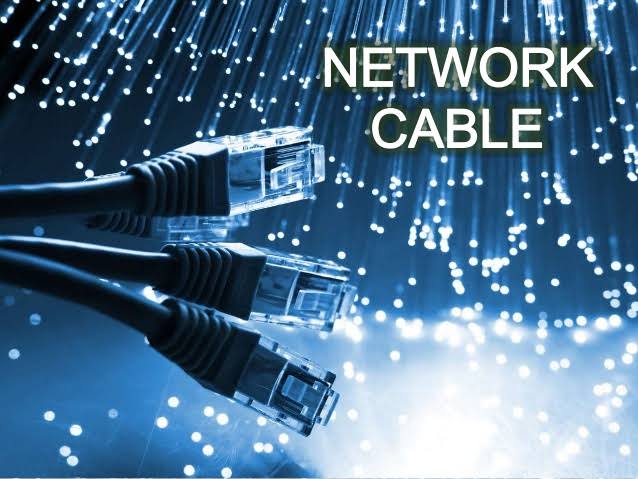
Network cables are used to connect and transfer data and information between computers, routers, switches and storage area networks . These cables are essentially the carrier or media through which data flows.
There are different types of communications cables, and the appropriate type to use will depend on the structure and topology of the overall architecture of the system. The most commonly used types of communications cables are dominated by what is referred to as “twisted pair cable”. In local area networks; typically office environments, retail and commmercial sites, copper commincations cabling, i.e.,twisted pair cable is by far the most commonly used type of cable.
Twisted pair cable is used in many ethernet networks. Comprising of four pairs of thin wires or conductors, these ‘wires’ or conductors, are contained inside of the insulation or outer sheath of the cable. Each pair is twisted into several additional twists. These twists are designed to prevent interference from other devices and indeed from other adjacent cables!
Fibre optic cabling is specified where high bandwidths may be needed; especially in the data centre environment and where an installation demands high capacity, typically a hospital, airports, banks….However, Fibre optic cabling is fast becoming the medium of choice for any installation that is sending high volumes of data!
Of course, there are other types of cables, i.e., coaxial cable, multipair cable and of course, other types of media such as wireless, otherwise known as wifi.

Philippine Electrical Code
Personal protective equipment (PPE)
It refers to protective clothing, helmets, goggles, or other garments or equipment designed to protect the wearer’s body from injury or infection. The hazards addressed by protective equipment include physical, electrical, heat, chemicals, biohazards, and airborne particulate matter. Protective equipment may be worn for job-related occupational safety and health purposes, as well as for sports annd other recreational activities. “Protective clothing” is applied to traditional categories of clothing, and “protective gear” applies to items such as pads, guards, shields, or masks, and others.
The purpose of personal protective equipment is to reduce employee exposure to hazards when engineering and administrative controls are not feasible or effective to reduce these risks to acceptable levels. PPE is needed when there are hazards present. PPE has the serious limitation that it does not eliminate the hazard at source and may result in employees being exposed to the hazard if the equipment fails.
Safety Glove
It is a garment covering the whole hand. Gloves have separate sheaths or openings for each finger and the thumb; if there is an opening but no (or a short) covering sheath for each finger they are called fingerless gloves. Fingerless gloves having one large opening rather than individual openings for each finger are sometimes called gauntlets, though gauntlets are not necessarily fingerless.
Gloves which cover the entire hand or fist but do not have separate finger openings or sheaths are called mittens. Mittens are warmer than gloves made of the same material because fingers maintain their warmth better when they are in contact with each other. Reduced surface area reduces heat loss.
Safety Goggles
Safety Googles or safety glasses are forms of protective eyewear that usually enclose or protect the area surrounding the eye in order to prevent particulates, water or chemicals from striking the eyes.
Antistatic wrist strap
ESD wrist strap, or ground bracelet is an antistatic device used to safely ground a person working on very sensitive electronic equipment, to prevent the buildup of static electricity on their body, which can result in electrostatic discharge (ESD).
Antistatic garments
Antistatic garments or antistatic clothing is required to prevent damage to electrical components or to prevent fires and explosions when working with flammable liquids and gases.
Anti-static Shoes
Anti-static Shoes or Static Dissipating Safety Shoes and Soft-Toe shoes are designed to dissipate (reduce) the amount of static electricity build-up on your body.
Dust mask
It is a flexible paper pad held over the nose and mouth by elastic or rubber straps for personal comfort against non-toxic nuisance dusts. A dust mask is also used to prevent the wearer from inhaling dust or sand in a dust storm or black blizzard.
Earmuffs
These are objects designed to cover a person’s ears for hearing protection or for warmth. They consist of a thermoplastic or metal head-band, that fits over the top or back of the head, and a cushion or cup at each end, to cover the external ears. This article focuses on earmuffs that are worn for hearing protection.
The Philippine Electrical Code is used nationally as the basis for safeguarding persons, buildings and its contents from hazards that may arise from the use of electricity.
Purpose
(a) Practical Safeguarding.
The purpose of this Code is the practical safeguarding of persons and property from hazards arising from the use of electricity.
The primary purpose of the Philippine Electrical Code is to minimize the risk of electricity as a source of electric shock and as a potential ignition source of fires and explosions; and to minimize the propagation of fire and explosions due to electrical installations.
(b) Adequacy.
This Code contains provisions that are considered minimum requirements necessary for safety. Compliance therewith and proper maintenance will result in an installation that is essentially free from hazard but not necessarily efficient, convenient, or adequate for good service or future expansion of electrical use.
FPN No. 1: Hazards often occur because of overloading of wiring systems by methods or usage not in conformity with this Code. This occurs because initial wiring did not provide for increases in the use of electricity. An initial adequate installation and reasonable provisions for system changes will provide for future increases in the use of electricity.
FPN No 2: It is highly recommended that a licensed electrical practitioner be consulted for any electrical requirements, including changes. Failure to do so may result in fire, serious injury, or death.
FPN No. 3: Fire hazard, electrocution, serious injury or even death may also occur with lack or improper maintenance of wiring system. Wiring system is recommended to be inspected and tested by a licensed electrical practitioner at least once a year for wiring system of more than three (3) years in installation.
Future expansion should always be given consideration when designing any electrical system. Future expansion may be unlikely in some new installations, but most of time, it is wise to plan an initial installation that allows for future additional loads, modifications, or designs. Ratings of conductors, switchboards and/or transformers need to be selected properly given these considerations without sacrificing initial cost.
(c) Intention.
This Code is intended for the exclusive use of licensed electrical practitioners (PEE, REE, and RME). This Code is not intended as a design specification nor an instruction manual for a non-licensed electrical practitioner, unless under the supervision of a licensed electrical practitioner.
The Philippine Electrical Code is intended for use by
• Qualified engineers in the design, installation and/or maintenance of electrical equipment;
• Inspection authorities having legal jurisdiction over electrical installations;
• Insurance inspectors;
• Electrical practitioners; and
• Instructors of electrical students.
(d) Relation to Other International Standards.
The requirements in this Code address the fundamental principles of protection for safety contained in Section 131 of International Electrotechnical Commission Standard 60364-1, Electrical Installations of Buildings.
The Philippine Electrical Code (PEC) is a modified version of the National Electrical Code. The modifications were made to suit the local Philippine environment and conversion into the SI system. This section of the Philippine Electrical Code makes it clear that the Philippine Electrical Code is compatible with international safety standards and address the fact installations meeting the requirements of the Philippine Electrical Code are also in compliance with the fundamental principles outlined in NEC.
FPN: IEC 60364-1, Section 131. Contains fundamental principles of protection for safety that encompass protection against thermal effects, protection against overcurrent, protection against fault currents, and protection against over voltage.
IEC 60364-1[1], Section 131
Protection for safety
General
The requirements stated in 131.2 to 131.7 are intended to provide for the safety of persons, livestock and property against dangers and damage which may arise in the reasonable use of electrical installations. The requirements to provide for the safety of livestock are applicable in locations intended for them.
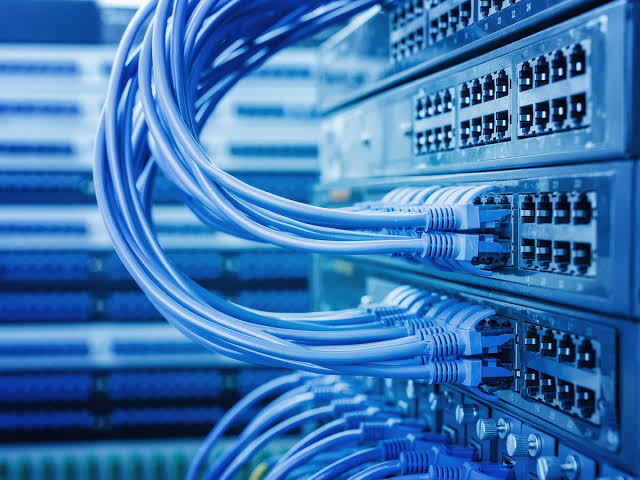
A local area network (LAN) is a group of computers and peripheral devices that share a common communications line or wireless link to a server within a distinct geographic area. A local area network may serve as few as two or three users in a home office or thousands of users in a corporation’s central office. Homeowners and information technology (IT) administrators set up LANs so that network nodes can communicate and share resources such as printers or network storage.
LAN networking requires Ethernet cables and Layer 2 switches along with devices that can connect and communicate using Ethernet. Larger LANs often include Layer 3 switches or routers to streamline traffic flows.
A LAN enables users to connect to internal servers, websites and other LANs that belong to the same wide area network (WAN). Ethernet and Wi-Fi are the two primary ways to enable LAN connections
You can integrate a Wi-Fi network into your Ethernet-enabled network by simply placing a Wi-Fi-enabled wireless router into your setup. By using a wireless router in your network, you can eliminate some of the Ethernet wired “LAN” connections for all computers that have a wireless air-card installed. This cleans up the look of your network and provides a wider connection range since you can connect via Ethernet and Wi-Fi.

The Network Interface Card or Network Interface Controller (NIC) card plays an important role in the function of your computer as it is the network adapter. Your internet connection comes through the NIC card as does all other network connectivity. The NIC card is a type of PCI expansion card as it is plugged into the motherboard’s PCI port. Learning more about the different types of NIC cards can help you to better understand how your computer’s network connection functions.
There are two main types of NIC cards with specific configuration types: ethernet and wireless. Ethernet NIC cards require that you plug an ethernet cable into the card to transfer network data and connect to the internet. The other end of this cable is either plugged into your modem or a router. Wireless NIC cards come with a small antenna attached to the card. The antenna picks up the wireless signal from your router and turns this into a usable internet connection for your computer. Note that the wireless NIC card requires additional setup on your computer as you will need to connect to the network on your computer by typing in the WiFi password for your wireless network.
HOW NIC CARDS FUNCTION
NIC cards are effectively the middle man between your computer and the network. They are responsible for translating data on the computer into a form that can be transferred via a network cable or wireless network signal. NIC cards also control the data as it is sent to other devices on the network. NIC cards therefore have a big influence on how quickly network data is sent and received, so if your computer’s internet speed is slow, it’s possible that the NIC card may be to blame. This is particularly the case if your NIC card is an older model as older NIC cards may not be able to adequately support top network speeds today.
How did i survive the distance learning modality this school year 2020-2021
This pandemic brought us into a chaos situation in many ways and one of this is education and because of that we’re suffering from distance learning last year because of the pandemic teachers make a way to keep students learning and that is we keep learning through modular and online class But even though there is a way to study again but I myself find distance learning difficult even do there are online classes, then how can i survive this school year?
At first i am adjusting myself because i really don’t know what to do and the first step that i did is to answer my module even in the module it’s hard to answer Because not all subjects are discussed through online so it’s the fact that it is self learning i need to learn every word and answer every question by myself and i admit that sometimes when i find it really difficult i need to search it and sometimes my friends and i are asking for help and we’re helping each other but not everything relies on search because I need to learn and make an effort to my works.also the young people are neglected because they are addicted to gadgets but me I’m not addicted to games but in k-drama but before i watch k-drama i ensure that i finish and completed all my works.
 MY SITE